Authenticated Setup
Lighter has no classic key/secret pair. An Ethereum wallet owns your Lighter account, but the
client never signs with the wallet key. It signs with an API key: a Lighter-specific
signing key (Schnorr over the ECgFp5 curve, not an Ethereum key) registered in one of your
account's key slots, 4 to 254. Every slot has its own nonce, which the client tracks
for you.
Create An API Key
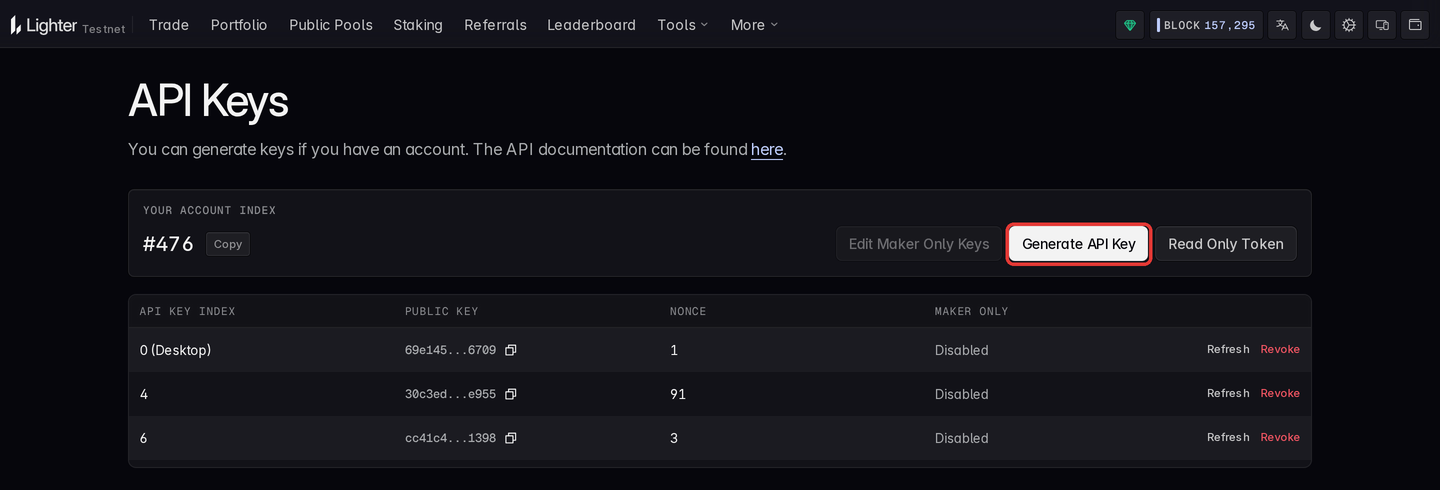
Connect your wallet on Lighter's API keys page and click
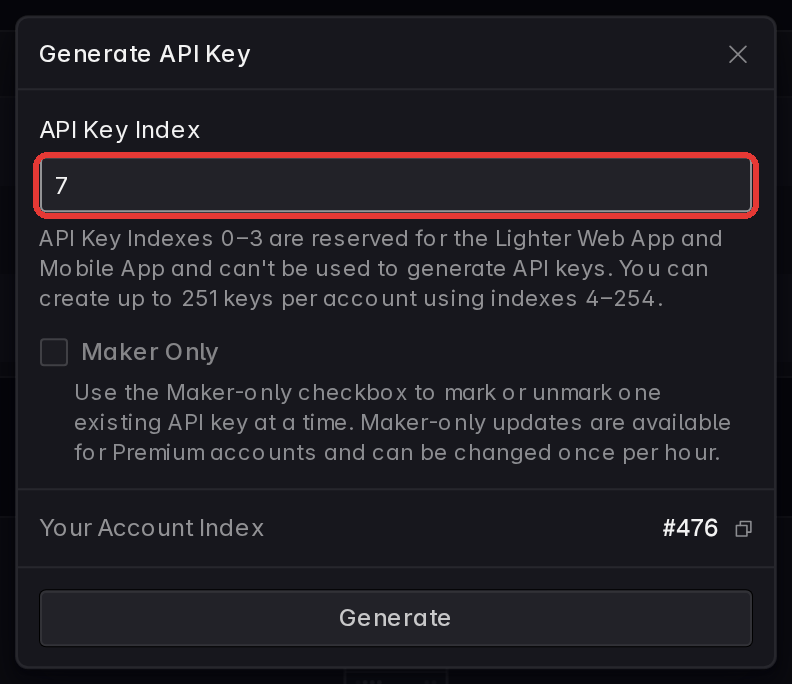
Generate API Key. Pick a free API Key Index from 4 to 254, click Generate, and
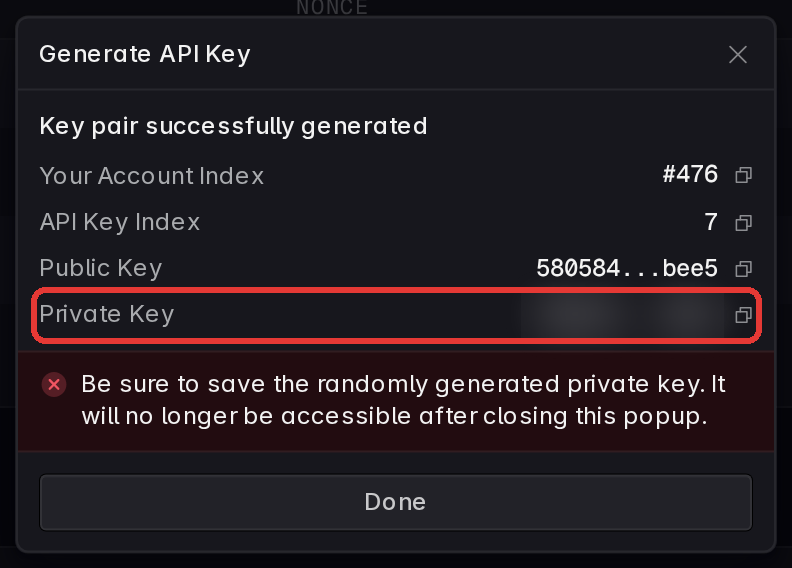
approve the registration in your wallet. The dialog then shows the new key pair: copy the
Private Key before clicking Done.
| 1) Generate an API key | 2) Pick a free index | 3) Copy the private key |
|---|---|---|
 |
 |
 |
- Indexes
0to3are reserved for Lighter's web and mobile apps (connecting the wallet can register one of them, like0 (Desktop)above), so API keys go in4to254: up to 251 keys per account. - The private key is shown once. It is no longer accessible after closing the dialog; a lost key is replaced by generating a new one in the same or another slot.
- The wallet's signature authorizes the key, so the wallet's own private key is never entered anywhere.
The page only offers keys once the wallet has an account: an Ethereum wallet's Lighter master account is created by its first deposit (there is no sign-up call). For testnet, use the testnet API keys page; test funds come from the testnet app.
Find Your Account Index
Every account is addressed by an integer account index. The API keys page shows yours
under Your Account Index (#476 above, without the #). From code, look it up by wallet
address, no credentials needed:
from typed_lighter import Lighter

async with Lighter.new(public=True) as client:
  accounts = await client.api.account.by_l1_address(l1_address='0x0000000000000000000000000000000000000000')
  for account in accounts['sub_accounts']:  # master account first
    print(account['index'], account['collateral'])
A wallet can also own sub-accounts, each with its own index and its own API keys.
Configure The Client
# .env
LIGHTER_ACCOUNT_INDEX="123"
LIGHTER_API_KEY_INDEX="4"
LIGHTER_API_PRIVATE_KEY="0x...api-private-key"
Paste the private key as the dialog shows it; the 0x prefix is optional. Each network reads
its own prefix, so testnet credentials are LIGHTER_TESTNET_ACCOUNT_INDEX,
LIGHTER_TESTNET_API_KEY_INDEX and LIGHTER_TESTNET_API_PRIVATE_KEY (LIGHTER_ROBINHOOD_*
for the robinhood networks, see Networks).
With these set, Lighter.new() needs no arguments:
from typed_lighter import Lighter

async with Lighter.new() as client:
  orders = await client.api.account.orders.active(account_index=client.signer.account_index)
  print(orders['orders'])
Arguments take precedence over the environment:
from typed_lighter import Lighter

client = Lighter.new(
  network='testnet',
  account_index=123,
  api_key_index=4,
  api_private_key='0x...api-private-key',
)
Signing happens locally; the private key never leaves the process. For market data alone,
skip credentials with Lighter.new(public=True).
Read-Only Access
A read-only token (ro:...) lets a dashboard or a monitoring job read your account
without holding an API key. Create one on the
read-only tokens page (Read Only Token on the
API keys page), or from code with a client that has an API key:

from datetime import datetime, timedelta, timezone

from typed_lighter import Lighter

async with Lighter.new() as client:
  created = await client.api.account.tokens.create(
    name='dashboard',
    account_index=client.signer.account_index,
    expiry=datetime.now(timezone.utc) + timedelta(days=30),
    sub_account_access=False,
  )

async with Lighter.new(auth_token=created['api_token']) as reader:  # or LIGHTER_AUTH_TOKEN
  print(reader.account_index)  # read from the token
  orders = await reader.api.account.orders.active(account_index=created['account_index'])
Read-only tokens allow private REST reads and private streams only: no transactions and no token-gated writes. They are valid from 5 minutes up to 10 years, at most 10 per account.
When You Also Need The Ethereum Key
Only these need eth_private_key (LIGHTER_ETH_PRIVATE_KEY); everything else runs on the
API key alone:
tx.change_api_keytx.transferto an account outside your own master accounttx.approve_integratorwith non-zero fee caps, for an integrator outside your master accounttx.fast_withdrawtx.lit_lease
Advanced
Register API Keys From Code
Registering a key is itself a transaction, change_api_key, and it is the one that needs
the Ethereum wallet: the wallet's signature authorizes the new key. The new key signs the
registration itself, locally, in the slot it is registered to, and only its public half is
sent. Generate it, then register it:
import asyncio

from typed_lighter import Lighter
from typed_lighter.core.signer import generate_api_key

key = generate_api_key()

# account index and Ethereum key from LIGHTER_ACCOUNT_INDEX / LIGHTER_ETH_PRIVATE_KEY
async with Lighter.new(api_keys={4: key.private_key}) as client:
  await client.tx.change_api_key(key.private_key, api_key_index=4)  # accepted, not yet executed
  for _ in range(30):  # wait until the sequencer has applied it
    registered = await client.api.account.keys.list(account_index=client.signer.account_index, api_key_index=4)
    if any(k['public_key'] == key.public_key for k in registered['api_keys']):
      break
    await asyncio.sleep(1)
change_api_key returns once Lighter has accepted the transaction, which is not the same
as executed: until the sequencer applies it, keys.list still shows the slot's previous
key (or none), and a transaction signed with the new key fails. The loop above waits for
the new key to show up. Store key.private_key as LIGHTER_API_PRIVATE_KEY and 4 as
LIGHTER_API_KEY_INDEX.
A client with a working key registers more keys, or replaces one, the same way; the slot being registered does not need to be configured on the client:
from typed_lighter import Lighter
from typed_lighter.core.signer import generate_api_key

async with Lighter.new() as client:  # an API key, plus LIGHTER_ETH_PRIVATE_KEY
  extra = generate_api_key()
  await client.tx.change_api_key(extra.private_key, api_key_index=5)
Several keys at once spread transactions round-robin across their nonces:
import os

from typed_lighter import Lighter

client = Lighter.new(
  account_index=int(os.environ['LIGHTER_ACCOUNT_INDEX']),
  api_keys={4: os.environ['KEY_4'], 5: os.environ['KEY_5']},
)
Key Formats
private_key is 0x-prefixed hex, as Lighter's own tools print it, and public_key is bare
lowercase hex, exactly as keys.list reports it, so the two compare equal as they are. Both
arguments and environment variables accept a private key with or without 0x.
Auth Tokens
Private REST reads, private streams and a few account writes authenticate with an auth
token instead of a signature. The token-gated writes, all under client.api, are
account.tokens.create and revoke, account.set_metadata, account.change_tier,
account.keys.set_maker_only, referral.create, update, update_kickback and use, and
rfq.create, update and respond.
- Derived tokens: with an API key configured, the client signs short-lived tokens
itself (10 minutes, renewed before expiry). They allow everything, including the
token-gated writes. Nothing to configure. Lighter rejects any such token whose expiry is
more than 8 hours ahead, so one signed by hand (
client.signer.auth_token(...)) lives 8 hours at most; it takes no start time. - Read-only tokens:
ro:...tokens issued by Lighter, valid from 5 minutes up to 10 years, at most 10 per account (see Read-Only Access).
auth_token= (or LIGHTER_AUTH_TOKEN) takes either kind: a read-only ro: token, or a
standard token signed beforehand with client.signer.auth_token(...). A pre-signed standard
token allows what a derived one does, token-gated writes included, but the client holds no
key to renew it: it stops working at its own expiry, at most 8 hours after it was signed.
With an API key set, LIGHTER_AUTH_TOKEN is ignored.
Credential Modes
Lighter.new() resolves credentials once, from arguments first and environment variables
second, and raises AuthError straight away when it finds none:
| Mode | Built with | Can use |
|---|---|---|
| Full | account index + API key | every surface |
| Read-only | an auth token | api private reads, private streams; with a pre-signed standard token, also the token-gated writes, until it expires (8 hours at most) |
| Public | public=True |
public api reads, public streams, explorer (where the network has one) |
client.account_index tells which account the credentials belong to: the API keys'
account in full mode, the token's in read-only mode, None for a public client.
Networks
network= picks the host, WebSocket URL and chain id together, and the prefix of the
environment variables read:
network |
Variables | client.explorer |
|---|---|---|
'mainnet' (default) |
LIGHTER_* |
yes |
'testnet' |
LIGHTER_TESTNET_* |
yes |
'robinhood' |
LIGHTER_ROBINHOOD_* |
none: calls raise LogicError |
'robinhood-testnet' |
LIGHTER_ROBINHOOD_TESTNET_* |
none: calls raise LogicError |
from typed_lighter import Lighter

client = Lighter.new(network='testnet')  # reads LIGHTER_TESTNET_ACCOUNT_INDEX, ...
Market ids differ per network: the ETH perp is market 0 on mainnet and the robinhood
networks, but 4095 on testnet (ETH/USDC spot is 4098 there). Look ids up with
client.api.markets.order_books() on the network you use; the examples in these docs use
mainnet's.
The full variable list is in Environment Variables; the upstream guide is API keys.